Pro Tips
AI voice or multichannel campaign management? Compare tools, real examples, costs, compliance, and six tests to choose the right outreach setup.

Jesse Wisnewski
CEO & Founder
Published
Read Time
12 min read

When you want to reach more supporters, should you start with AI phone calls or a platform that also handles texts, emails, and follow-up? Here’s how to choose without buying more software than you need.
Say you’re inviting past donors to an event. You could call them with an AI voice tool. But what if someone misses the call, asks you to email the details, or wants to speak with a person on your team? Who makes sure that happens?
That’s the difference worth understanding. AI voice software focuses on phone conversations. Multichannel campaign management connects several ways of reaching people and helps your team keep track of what happens next. If a call is the whole job, a voice tool may be enough. If the conversation continues through email, text, or a personal reply, a broader platform may be more useful.
The goal isn’t to contact everyone in every possible way. It’s to make it easier for your team to follow through when someone responds.
In this post, I’m going to cover:
What these tools do, in plain language
When AI voice is enough and when you need more
What different vendors actually offer
Six questions to ask before buying
Real examples, a simple test campaign, and the safeguards to check
What’s the difference between AI voice and multichannel campaign management?
An AI voice tool helps you have phone conversations using a computer-generated voice. Some tools read a prepared message. Others can listen and respond to questions. Still others help transfer a call to a staff member. Those are different things, so ask a vendor to show you exactly what its product can do. If the term is new to you, our guide to what an AI voice agent is explains the basics.
Multichannel campaign management means planning and tracking outreach across more than one channel, such as phone, text, and email. For example, you might send an event invitation by email, make an approved follow-up call, and send a registration link by text when someone asks for it. Your team can also see who needs a personal response.
Here’s a useful distinction: AI voice helps with the conversation. Multichannel tools help with the whole follow-up process. One platform may offer both, but the names alone won’t tell you what it can do.
Neither tool automatically replaces your donor database or the system that processes gifts. You still need one reliable place to keep donor records, contact preferences, and giving history.
When is an AI voice tool enough?
You don’t need a large system for every task. If you have one clear reason to call, and your team already knows how to handle replies, a voice-only tool may be the simpler choice.
Before using AI voice, ask four questions:
Is the goal simple? Reminding someone about an event is different from asking why a long-time donor has stopped giving.
Can you predict the questions? You can prepare answers about a meeting time or a registration link. You can’t prepare for every personal concern.
Is it a low-risk conversation? A routine reminder is different from changing a donation, discussing a major gift, or handling private information.
Can a person step in? If someone asks for help, your staff should know who will respond and when.
An event reminder may pass all four tests. A sensitive conversation about a donor’s finances probably won’t. That’s why people, not technology, should own the relationships that need judgment and care.
For more examples, see our guide to AI voice agents for nonprofit organizations. You can also explore the EverRaise AI Voice product page for information about calling and related follow-up features. Check what’s currently included before deciding whether it fits your team.
When does a multichannel platform make more sense?
Think about the next step after someone answers. If that next step often happens somewhere else, you’ll want a way to keep everything connected.
Imagine you’re inviting former event attendees to come back. You send the details by email. Someone registers right away, so you stop sending them registration reminders. Another person asks for the location by text. Someone else wants to talk with your event coordinator. A fourth person asks not to receive more messages.
Each response calls for something different. If your staff must check three systems and move everything by hand, important details can be missed. A well-set-up multichannel campaign helps your team see those responses and act on them without treating everyone the same.
For a practical look at the calling piece, read our AI outbound calling guide. Our donor communication best practices guide also explains how to make follow-up feel useful rather than repetitive.
EverRaise’s engagement tools support approved campaigns across voice, voicemail, text, and email, with staff review and follow-up. That can help when your main problem is coordinating what happens after someone responds. But if your existing donor database and email tools already do that well, you may not need another platform.
How do the software options compare?
A lot of products sound similar until you ask them to perform the same task. Some are tools for building your own phone system. Others focus on messages or handle a longer sequence of steps. Here are three examples from the companies’ own documentation, not a hands-on ranking.
Twilio: For teams building their own system
Twilio’s Programmable Voice tools give developers the pieces they need to make and receive calls in software they build. That gives a technical team flexibility. But someone still needs to create the campaign, connect supporter records, manage opt-outs, and build the follow-up steps. It’s a different kind of purchase from a ready-to-use campaign tool.

Figure 1. Twilio’s Programmable Voice tutorials and developer interface. Source: Twilio’s published voice resources.
CallHub: For specific calling campaigns
CallHub documents voice broadcasts that play a recorded or computer-read message and can let someone press a button to respond or opt out. That may work for a straightforward reminder. Don’t confuse a recorded call with an AI agent that can have a back-and-forth conversation.

Figure 2. CallHub Voice Broadcast campaign settings. Source: CallHub’s published demonstration (interface may differ today).
Salesforce Marketing Cloud Engagement: For broader marketing programs
Salesforce offers tools for email, mobile messages, and planned customer journeys. Those may fit organizations with larger marketing teams. But don’t assume every multichannel tool includes conversational AI phone calls. Ask the vendor to show what is included and what requires another product or setup work.
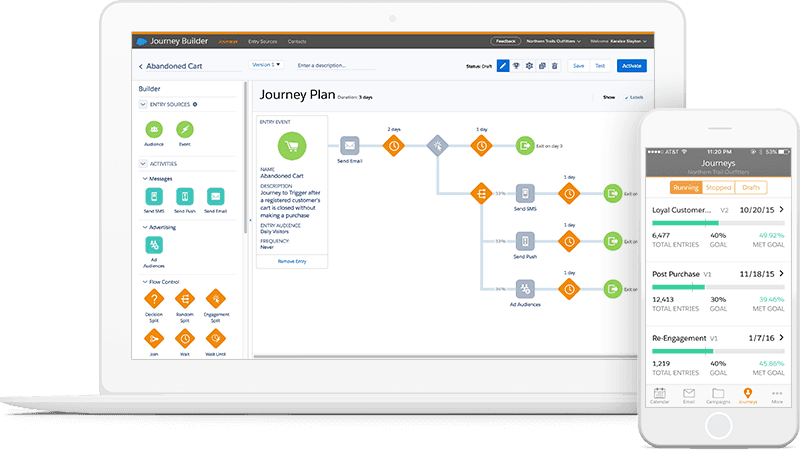
Figure 3. Salesforce Marketing Cloud Engagement Journey Builder. Source: Salesforce product materials.
And if your main need is help writing a campaign, rather than running it, that’s a different decision. Our guide to AI campaign builders covers that question. The right comparison starts with the work you need done, not the software category that sounds most impressive.
Six questions to ask before buying outreach software
Bring one real campaign idea to every demo. Rather than watching a polished sales presentation, ask each vendor to show what would happen if a supporter answers, misses a call, asks for help, or wants you to stop contacting them.
What happens during a call? Ask for a live example. Can the tool answer a simple question? What happens when the person interrupts or asks something unexpected?
What happens when someone doesn’t answer? Can your team follow up appropriately without starting a new list from scratch?
Will it respect contact preferences? Show the vendor an example of someone who opted out. Ask how the system prevents unwanted outreach. A valid phone number is not the same as permission to call.
Can a staff member take over? Have the test contact ask for a person. See who gets the request and how you know it was answered.
Will it work with your donor records? Ask which details it can read or update, what needs manual work, and which connections are actually available today.
What will it really cost? Look beyond the monthly fee. Ask about calling minutes, texts, setup, support, and the time your staff will spend checking replies.
A simple way to compare vendors is to mark each answer as shown working, possible with extra work, or not available. Don’t give a tool credit for a feature that appears only on a slide. If you have to spend hours moving information between systems, include that time in your decision.
What are real organizations learning?
The tools matter, but the goal is bigger than saving time on phone calls. A few real examples show why it’s worth thinking about the entire relationship.
Kent State: A phone center with a different purpose
In a 2025 CASE article, Kent State University described a drop in results from its traditional phone fundraising program. Over five years, it reported that new commitment dollars through the center had fallen 56%. Kent State opened a multichannel Alumni Engagement Center in April 2023.
That change wasn’t proof that one piece of software increased giving. It was a change in how the school approached alumni conversations. Instead of treating every contact mainly as another fundraising ask, the team made room for more ways to connect and help.
Mercer: People still make the calls
Mercer University says its Digital Engagement Center, launched in fall 2024, uses student engagement officers who call alumni and friends and create personal videos and emails. This is a good reminder that better outreach doesn’t always mean replacing callers with AI. Sometimes you need to give your existing team better ways to connect.
EverRaise: More reach, with results that need context
In its September 2026 product update, EverRaise reported a university campaign that reached 868 contacts in less than five hours, with 163 live answers and 116 link clicks. It also estimated that the campaign saved more than 20 staff hours.
Those figures came from one company-reported campaign. The time savings were estimated, and the results don’t prove that giving or alumni retention increased. They do show the kind of activity a connected campaign can report. What matters next is whether staff use that information to help the people who responded.
Try one small campaign before you choose
You don’t need to move your entire donor list into a new system to test it. Start with one suitable audience, one approved message, and a clear goal. Use the same test with every vendor.
For example, suppose you want to invite 100 eligible past event attendees to a new program briefing. Ask the vendor to show how it would handle these situations: someone accepts, someone asks for the details by email, someone wants to speak with staff, and someone opts out. Use test records for the demonstration and check permissions before any real outreach.
Before launching a live campaign, have your team approve the audience, wording, timing, contact permissions, and what happens when someone replies. Then track a few practical measures:
How many eligible supporters did you reach?
How many people asked a question, requested details, or registered?
How many requests for staff follow-up actually received a response?
How many people opted out or reported a problem?
How much did the full campaign cost, including staff time?
Here’s one useful measure: if 12 people request a personal reply and staff answer 9 within the promised time, your follow-up completion rate is 75%. That’s an example, not an industry benchmark. It tells you something a call count cannot: whether your team kept its promises.
If a voice tool can do the job and you have a good follow-up process already, keep it simple. If you keep losing track of requests between calls, texts, and emails, a broader platform may be worth testing.
What about consent, privacy, and AI calling rules?
Before you call or text anyone, check that you have the permission required for that type of message. A number in your database doesn’t mean you can contact it however you want.
The FCC’s 2024 ruling explains that rules for artificial or prerecorded voice calls also apply to AI-generated voices. The FTC’s CAN-SPAM guide explains how certain email rules depend on the purpose of the message. Requirements can vary by channel, purpose, and location, so your team should review the specific campaign with qualified legal or privacy advisers.
Ask every vendor how you can honor opt-outs, protect personal information, manage recordings, and move a difficult conversation to staff. These aren’t optional details. They’re part of treating supporters with respect.
Common questions about AI voice and multichannel tools
Can a multichannel platform replace an AI voice tool?
Sometimes, but not always. Some include AI conversations; others use separate calling tools, and some focus on email and text. Ask for a demonstration of the exact phone experience you need.
Should a small nonprofit start with AI voice?
Start with your goal and the people you’re trying to reach, not the technology. If your donor records are messy, your team can’t handle replies, or you haven’t checked permissions, fix those basics first. Then test a small, suitable call campaign.
Can AI voice handle donor cultivation?
It may help with narrow, approved tasks, like reminders or basic information requests. A personal conversation about a major gift, a problem, or someone’s circumstances is usually better handled by a person who knows the relationship.
How do I know whether the software is worth it?
Measure useful responses, completed follow-up, opt-outs, total costs, and staff time. A high call volume doesn’t tell you whether donors felt heard or whether your team delivered what it promised.
Choose the tool that helps you follow through
You don’t need every channel or the most advanced platform. You need a sensible way to reach people and respond when they answer.
If your main job is one straightforward phone conversation, a voice tool may be enough. If that conversation often leads to an email, a text, or a personal reply, test a platform that keeps those steps together. Whatever you choose, your team should remain responsible for the relationships.
If you’d like to see how reviewed calls, texts, emails, and staff follow-up could work for your organization, request an EverRaise demo. Bring one real campaign idea and ask us to show what happens from the first message to the final reply.


